
Smart Email
Your Digital Worker detects a moment in the call, a lead mentions budget, a caller asks to speak to a human, someone books an appointment, and fires an email to your team while still on the call. No delay. No summary. A live alert.During vs after: Smart Email sends during the conversation. Activity Reports send after every call ends automatically. Most teams use both.
What You Receive
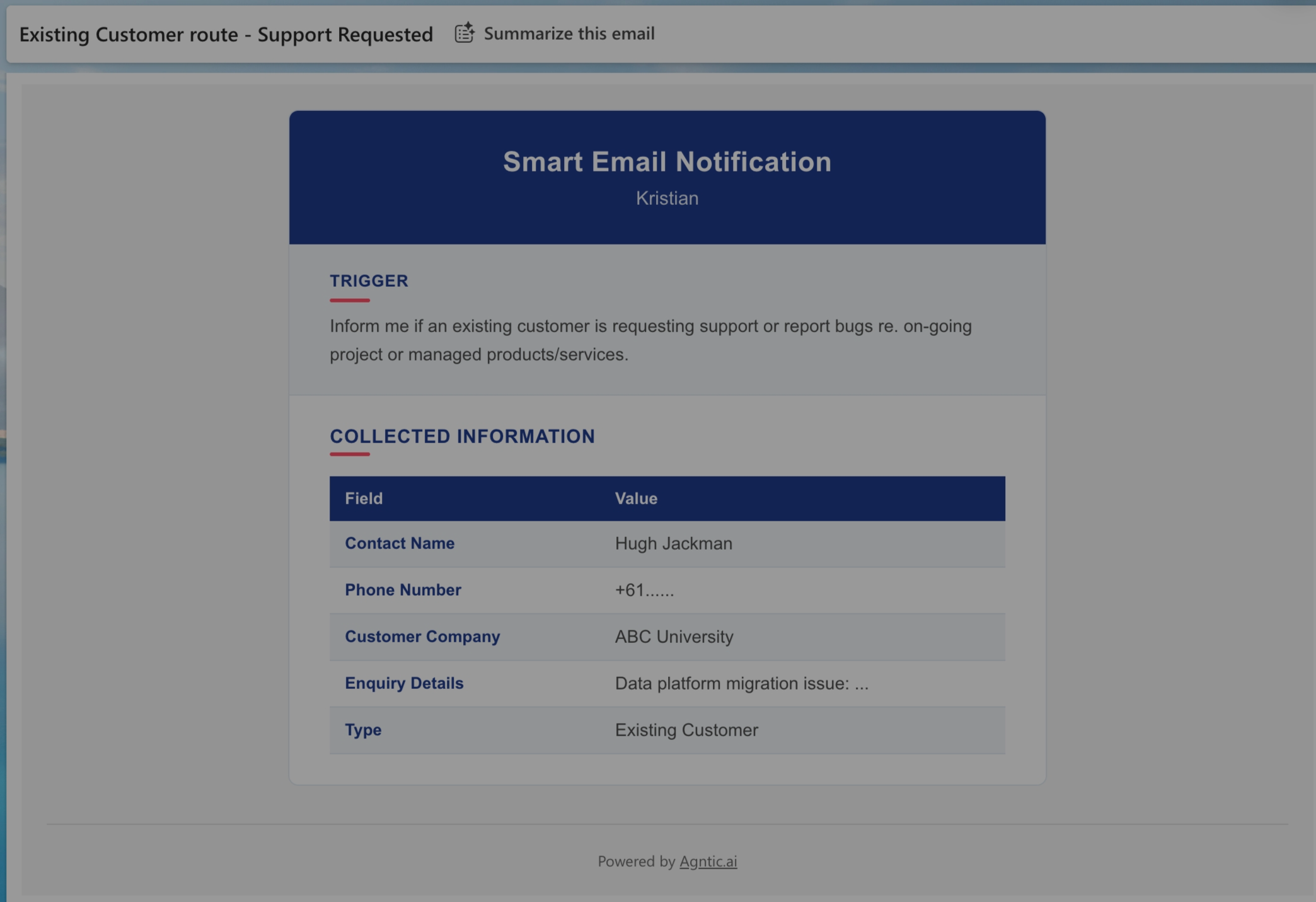
Each Smart Email includes:- Trigger: The condition that fired the email
- Collected data: Information captured at that moment (name, phone, enquiry details, etc.)
Use Cases
Lead capture
Notify sales when a caller shows buying intent
Urgent escalation
Alert on-call team for critical issues
Appointment requests
Notify scheduling team instantly
VIP detection
Alert when high-value customers call
Setting Up Smart Email
Prerequisites
- Digital Worker must be ACTIVE
- Email channel must be ACTIVE
- At least one recipient configured
- Trigger condition defined
Writing Good Triggers
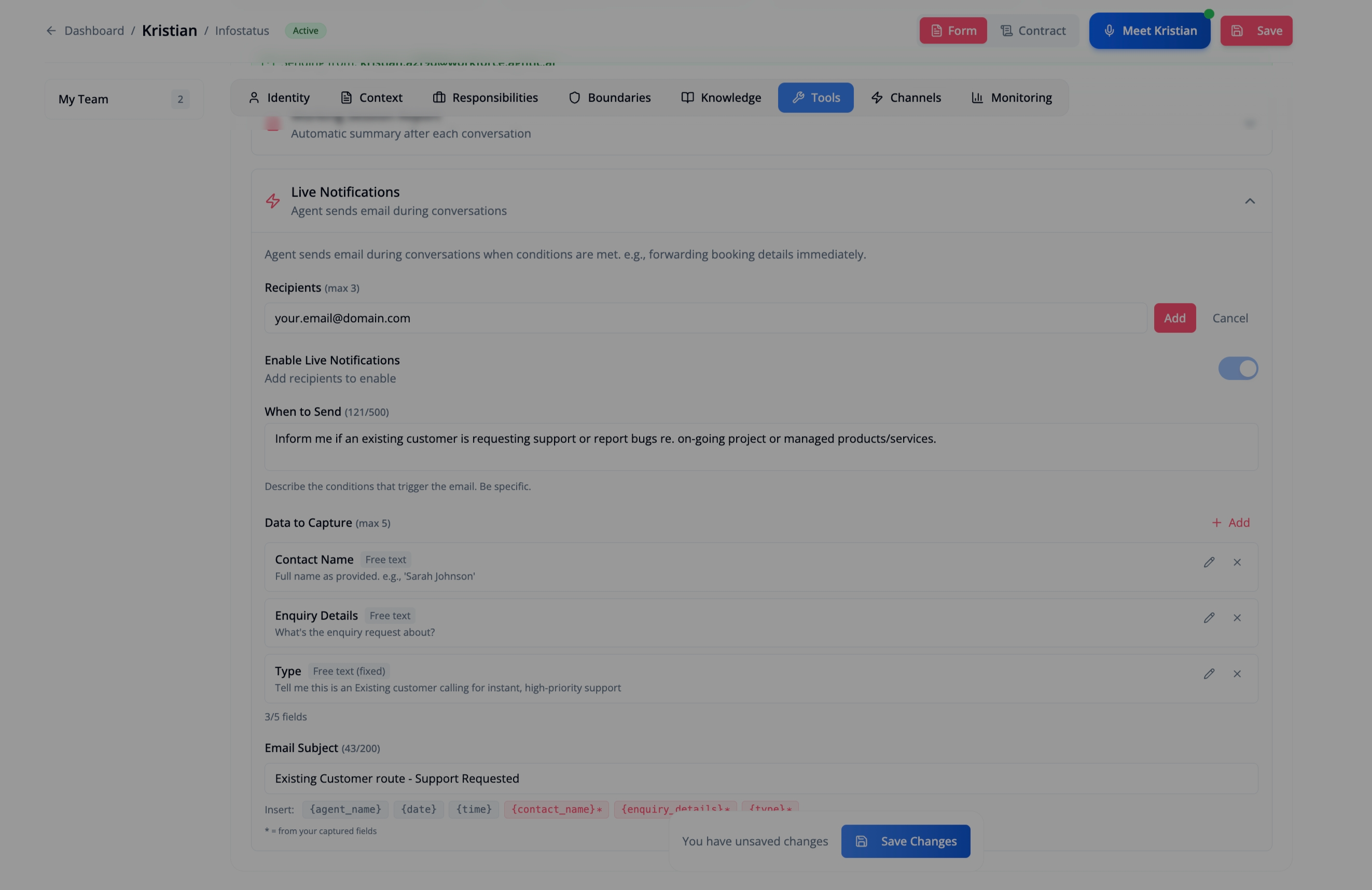
Tell your Digital Worker when to send the email. Be specific.| Good Triggers | Why |
|---|---|
| ”When caller provides name and phone number” | Clear, specific data points |
| ”When caller mentions wanting to upgrade” | Detectable intent signal |
| ”When caller asks for human support” | Explicit request |
| ”When an existing customer reports a bug” | Clear condition + customer type |
| Avoid | Why |
|---|---|
| ”When appropriate” | Too vague |
| ”When caller seems interested” | Too subjective |
Data Fields
Define what information to capture when the trigger fires:| Field Type | Use For | Example |
|---|---|---|
| Free text | Open responses | ”Contact Name”, “Enquiry Details” |
| Fixed | Always include this value | ”Type: Existing Customer” |
- Name: What appears in the email (e.g., “Contact Name”)
- Description: Instructions for what to collect (e.g., “Full name as provided”)
Email Subject
Customise the subject line using variables:| Variable | Replaced With |
|---|---|
{agent_name} | Your Digital Worker’s name |
{date} | Date of the call |
{time} | Time of the call |
{field_name} | Any captured field value |
Smart Email vs Activity Reports
| Smart Email | Activity Reports | |
|---|---|---|
| When | During call | After call |
| Trigger | Condition you define | Every call |
| Best for | Real-time alerts | Call records |
Troubleshooting
Email not being sent
Email not being sent
- Check trigger description is clear and specific
- Verify email channel is ACTIVE
- Confirm recipients are configured
- Test with an obvious trigger phrase
Wrong information captured
Wrong information captured
Review field descriptions. Make them more specific:
- Bad: “Phone”
- Good: “Caller’s phone number including area code”
Too many emails
Too many emails
Make your trigger more specific. Instead of “when caller provides info”, use “when caller provides name AND phone AND expresses interest in purchasing”.
Related
- Activity Reports: Post-call email summaries
- Email Channel: Set up your Digital Worker’s email address
- Call Transfer: Transfer callers to your team